
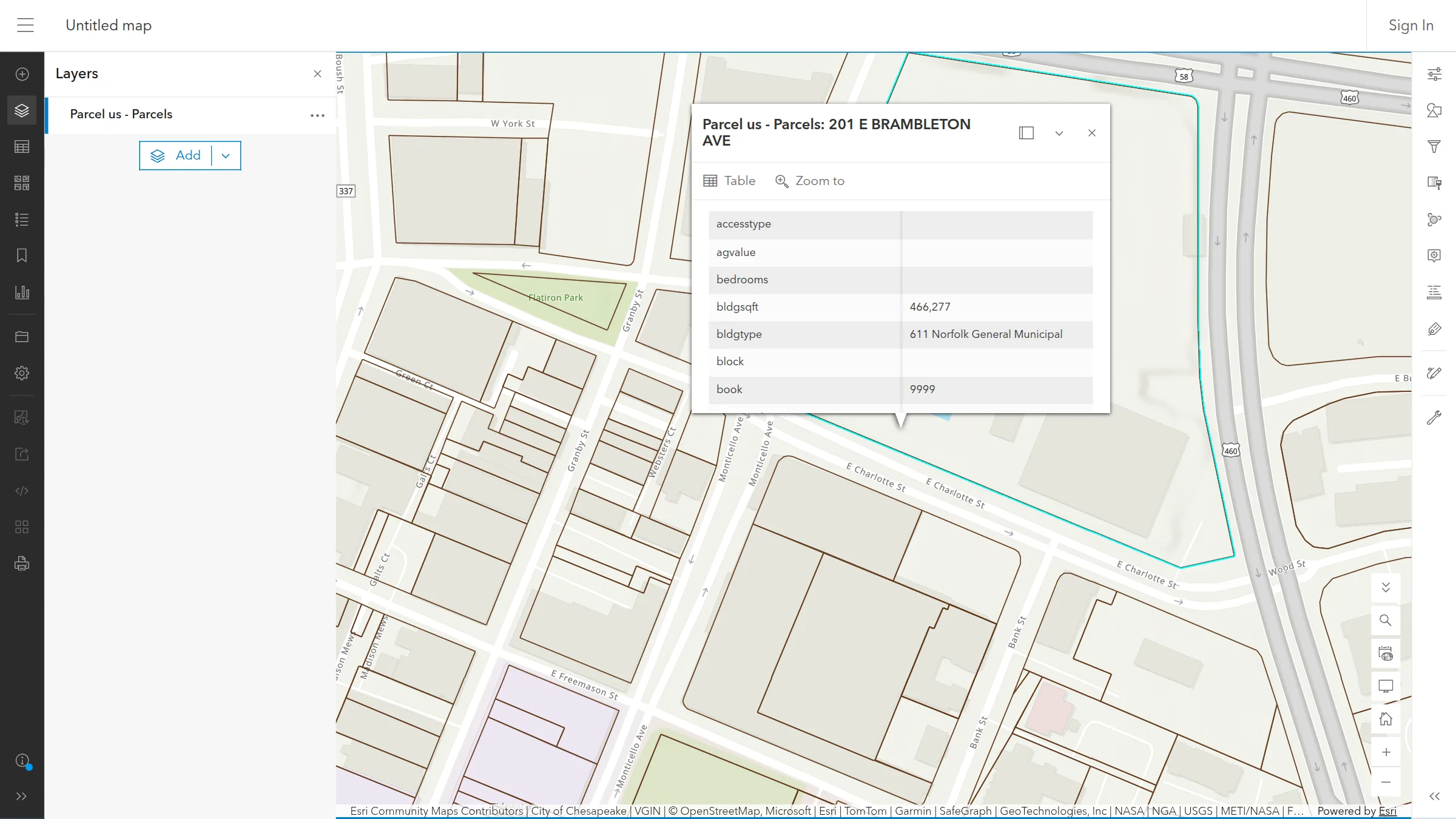
Every Land Records API key now works in ArcGIS. The US and Canadian parcel layers are published the way ArcGIS Server publishes a layer, as a FeatureServer, a MapServer and a VectorTileServer, so ArcGIS Online, ArcGIS Pro and the ArcGIS Maps SDK for JavaScript add them by URL like any other Esri service. Popups, attribute tables, SQL where clauses and spatial queries all work. The map at the top of this post is ArcGIS Online Map Viewer with the parcel FeatureServer added by URL and a popup open on Norfolk’s Scope arena.
And on every plan, raster tiles are no longer metered. It costs us less to serve more tiles than it did to count them, so we stopped counting.
Three services, one URL
The services directory is https://api.landrecords.us/arcgis/rest/services, and the same services answer on api.landrecords.ca. Each country is published three ways:
| Service | Add this URL | Use it for |
|---|---|---|
| FeatureServer | …/services/parcel_us/FeatureServer | Popups, attribute tables, filters and queries, from about 1:18,000 in |
| MapServer | …/services/parcel_us/MapServer | Parcels at every scale as image tiles, plus export, identify and find |
| VectorTileServer | …/services/parcel_us/VectorTileServer | The parcel vector tiles, styled as outlines |
Use parcel_ca in place of parcel_us for Canadian parcels. These aren’t a copy. The services read the same parcel table and the same tile pyramids as our OGC endpoints, refreshed on the same schedule, under the same plans.
Sign in with your API key
ArcGIS clients sign in through the server’s token endpoint. Enter any user name, and your API key as the password. The token that comes back is your key, so there’s no second credential to manage, and disabling a key ends every session made with it. In ArcGIS Online:
- Open Map Viewer and choose Add → Add layer from URL.
- Paste
https://api.landrecords.us/arcgis/rest/services/parcel_us/FeatureServer. - When Map Viewer asks you to sign in, enter any user name and your API key.
In ArcGIS Pro, add a server connection (Insert → Connections → New ArcGIS Server) or use Add Data From Path with the same URL. The feature layer needs ArcGIS Pro 3.2 or later, because each parcel’s objectid is a 64-bit integer, computed from its permanent lrid so it never changes between data loads. QGIS reads ArcGIS object ids as 32-bit, so in QGIS add the MapServer or VectorTileServer, or keep using the WFS for parcel features.
Want to see it before you have a key? Our public web map, Landrecords US and Canada Nationwide Parcel Layer, opens in Map Viewer for anyone, with watermarked demo tiles.
Queries work the way Esri’s do
The FeatureServer’s query operation takes the standard ArcGIS parameters: a where clause in standard SQL, a geometry with spatialRel and distance, objectIds, outFields, outSR, orderByFields, pages of up to 2,000 features, counts, ids, extents and statistics, answered as Esri JSON, GeoJSON or PBF. Here are the five most valuable parcels in Norfolk, Virginia:
https://api.landrecords.us/arcgis/rest/services/parcel_us/FeatureServer/0/query
  ?where=geoid = '51710' AND totalvalue > 50000000
  &outFields=parceladdr,totalvalue
  &orderByFields=totalvalue DESC
  &resultRecordCount=5&returnGeometry=false&f=json&token=<YOUR_KEY>
parceladdr | totalvalue |
|---|---|
| 0 W ADMIRAL TAUSSIG BLVD | $973,034,400 |
| 7737 HAMPTON BLVD | $340,930,400 |
| N S TERMINAL BLVD | $220,251,000 |
| 600 GRESHAM DR | $212,381,800 |
| 811 E CITY HALL AVE | $184,749,600 |
With 161 million US parcels behind it, a query has to be narrowed by something an index can serve: objectIds, a where on geoid, parcelid, lrid or owner name, or a geometry. A filter on other fields alone, such as totalvalue > 1000000, is answered inside a geometry of up to 100 km². That’s the same rule our WFS search follows, and it’s what keeps every answer fast.
On the US FeatureServer, parcels also come with a related Building permits table, joined by lrid, so a Map Viewer popup can list a parcel’s permits next to its attributes.
ArcGIS requests count on the meters your plan already has. A VectorTileServer tile is a vector tile. An identify, or a query for up to 10 parcels by id or at a point, is a parcel record request. Other queries, counts, statistics and export images are searches. Service descriptions, styles and sign-in are free. A MapServer tile is a raster tile, which brings us to the second change.
Raster tiles are now unmetered
A raster tile is a pre-rendered PNG. Almost every one is answered from the edge cache or our stored tile pyramid, and serving it costs very little. Counting it was the expensive part: every tile meant a write to our metering database, on every pan and zoom of every map. When counting a tile costs more than serving it, the meter isn’t worth keeping, so we’ve removed it.
- Every plan that includes raster tiles now includes them unlimited. That’s Pro, Pro Canada, Pro North America, custom plans and the 14-day free trial. Pro’s old allowance was 1,000,000 raster tiles a month.
- Every URL form counts the same way, which is not at all. That covers XYZ, TMS, WMTS
GetTileand ArcGIS MapServer tiles. - Nothing changes in your integration. The URLs and tiles are the same. Your account page just stops showing a raster tile count.
- The other meters are unchanged. Vector tiles, parcel records, searches and MCP tool calls keep their monthly quotas. Past 100% we add 50% more at no charge, and a meter only pauses at 200%.
The ArcGIS setup is in the Web API documentation, and plans start with a free 14-day trial on the Parcel Web API page. If your team runs ArcGIS Enterprise or needs something the services don’t do yet, get in touch.