
Web API
OGC web services (WMS, WFS, WMTS) for tile rendering and per-parcel attribute lookup.
The dataset is also made available to customers as OGC (WMS, WFS, etc) web services.
Every data endpoint takes the API token issued after signup, either as
Authorization: Bearer <TOKEN> or as a ?token=<TOKEN> query parameter. GetCapabilities,
DescribeFeatureType and GetLegendGraphic are public and unmetered — they describe the
service rather than return parcel data.
Tile URL patterns
Two URL shapes serve the same tiles, and they differ in how they count rows:
| Route | y origin |
Use it from |
|---|---|---|
https://api.landrecords.us/pro:parcel_us@EPSG:3857x2@pbf/{z}/{x}/{y}.pbf |
XYZ, top-left | QGIS, ArcGIS, Leaflet, OpenLayers, any plain XYZ client |
https://api.landrecords.us/pro:parcel_us@EPSG:3857x2@png8/{z}/{x}/{y}.png8 |
XYZ, top-left | same |
https://api.landrecords.us/pro/gwc/service/tms/1.0.0/pro:parcel_us@EPSG:3857x2@png8/{z}/{x}/{y}.png8 |
TMS, bottom-left | clients configured for TMS (MapLibre scheme: 'tms') |
Use plain {y} on both — there is no {-y} form. The route already decides the convention,
so flipping y on top of it asks for a tile 2×|latitude| away, which is usually open water.
When in doubt, use the bare (non-/gwc/service/tms/) paths: that is what our WMTS
GetCapabilities advertises as its ResourceURL templates.
Tiles are also served under EPSG:900913 (EPSG:900913x2). There is no EPSG:4326 grid set, so
connect with EPSG:3857 or EPSG:900913 only. All raster tiles are 512×512 px.
Fun fact: this is the same service that powers our data explorer! It is a MapLibre source configured like so:
yourAuthToken = ...;
map.current = new maplibregl.Map({
    style: {
        version: 8,
        sources: {
            parcel_us: {
                type: 'raster',
                scheme: 'tms',
                tiles: ['https://api.landrecords.us/pro/gwc/service/tms/1.0.0/pro:parcel_us@EPSG:3857x2@png8/{z}/{x}/{y}.png8'],
                tileSize: 512
            }
        }
    },
    transformRequest: (url, resourceType) => {
        if (resourceType === 'Tile' && url.startsWith('https://api.landrecords.us')) {
            return {
                url: url,
                headers: { 'Authorization': 'Bearer ' + yourAuthToken }
            }
        }
    }
});
Drop scheme: 'tms' and point the same source at the bare
https://api.landrecords.us/pro:parcel_us@EPSG:3857x2@png8/{z}/{x}/{y}.png8 path to get the
identical tiles over the XYZ convention. For a vector source, use type: 'vector' with the
@pbf path — parcel attributes travel inside the tile, so hover, highlight and labels resolve
client-side with no round trip.
Parcel Coverage Map Service
We publish our coverage map as a web service for use in your applications. This is the same service that powers our public website at http://landrecords.us/products. It contains information about parcel coverage, as well as coverage for selected attributes.
- County Coverages:
https://api.landrecords.us/pro:county_coverage@EPSG:3857x2@pbf/{z}/{x}/{y}.pbf?token=<TOKEN> - State Coverages:
https://api.landrecords.us/pro:state_coverage@EPSG:3857x2@pbf/{z}/{x}/{y}.pbf?token=<TOKEN>
Both coverage layers are vector-only, and both are also reachable over the TMS route
(/pro/gwc/service/tms/1.0.0/…) with bottom-left rows.
QGIS: Configure in a WMS/WMTS Connection
You can easily load the Nationwide Parcel layer into QGIS.
First, Create a New WMS/WMTS Connection.

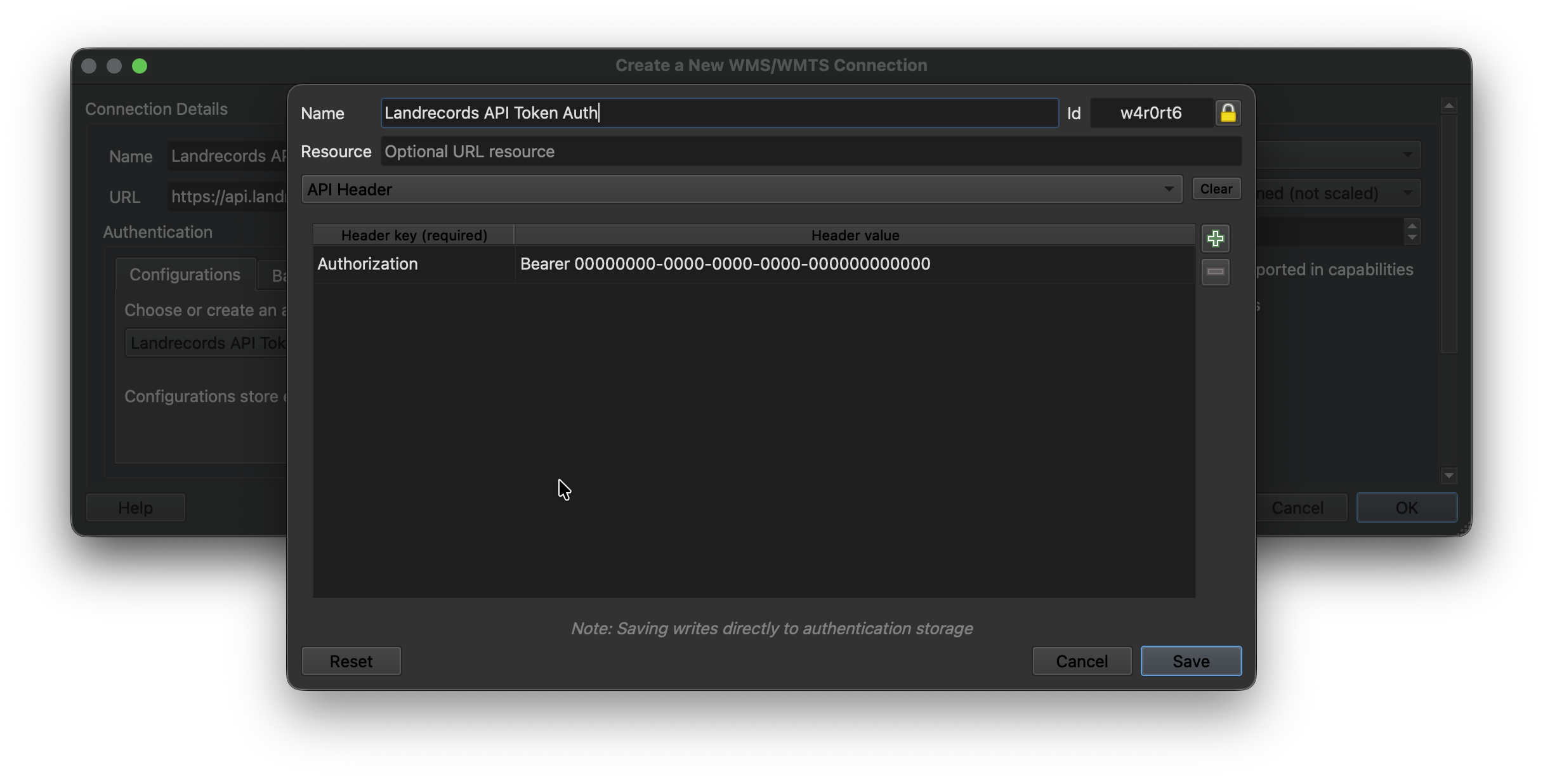
Then configure the new connection by pointing to the Landrecords API endpoint (api.landrecords.us), and setting the Authorization token provided after signup:
https://api.landrecords.us/pro/gwc/service/wmts

https://api.landrecords.us/pro/wms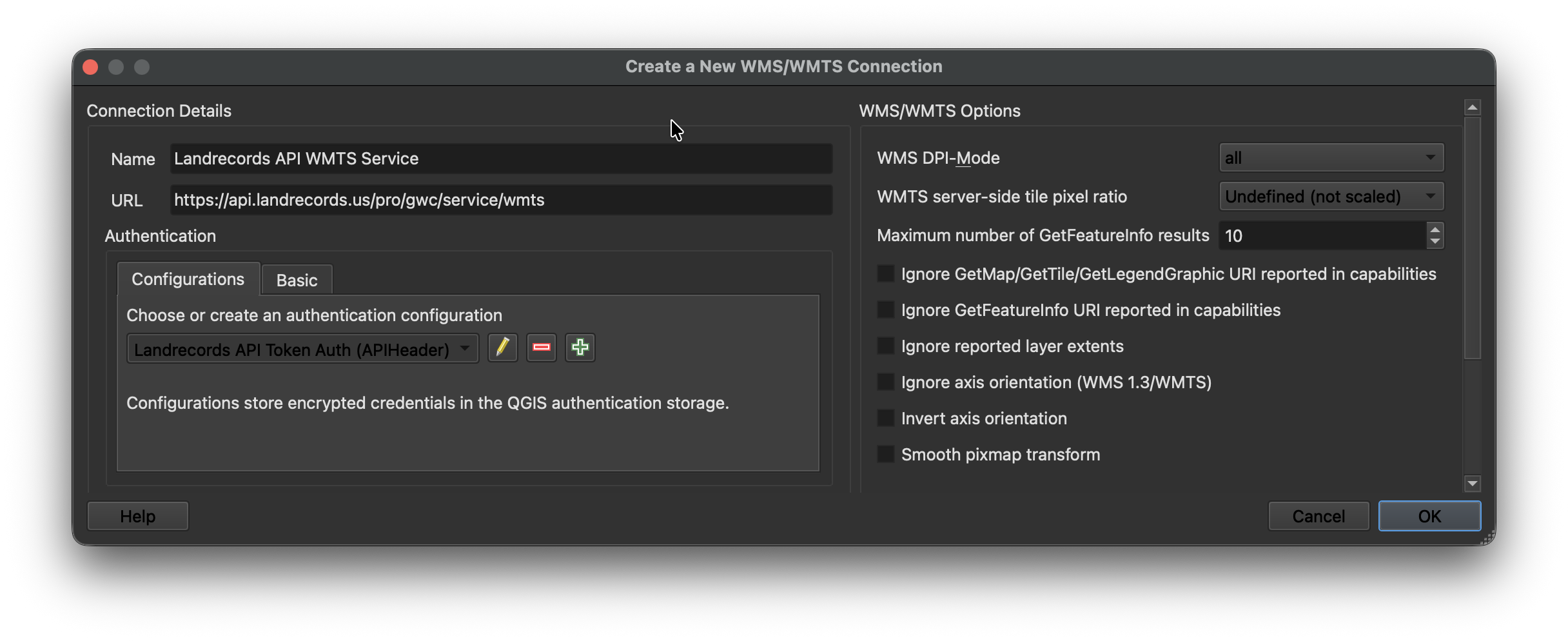
Now you will see all the layers available to you in the Browser:
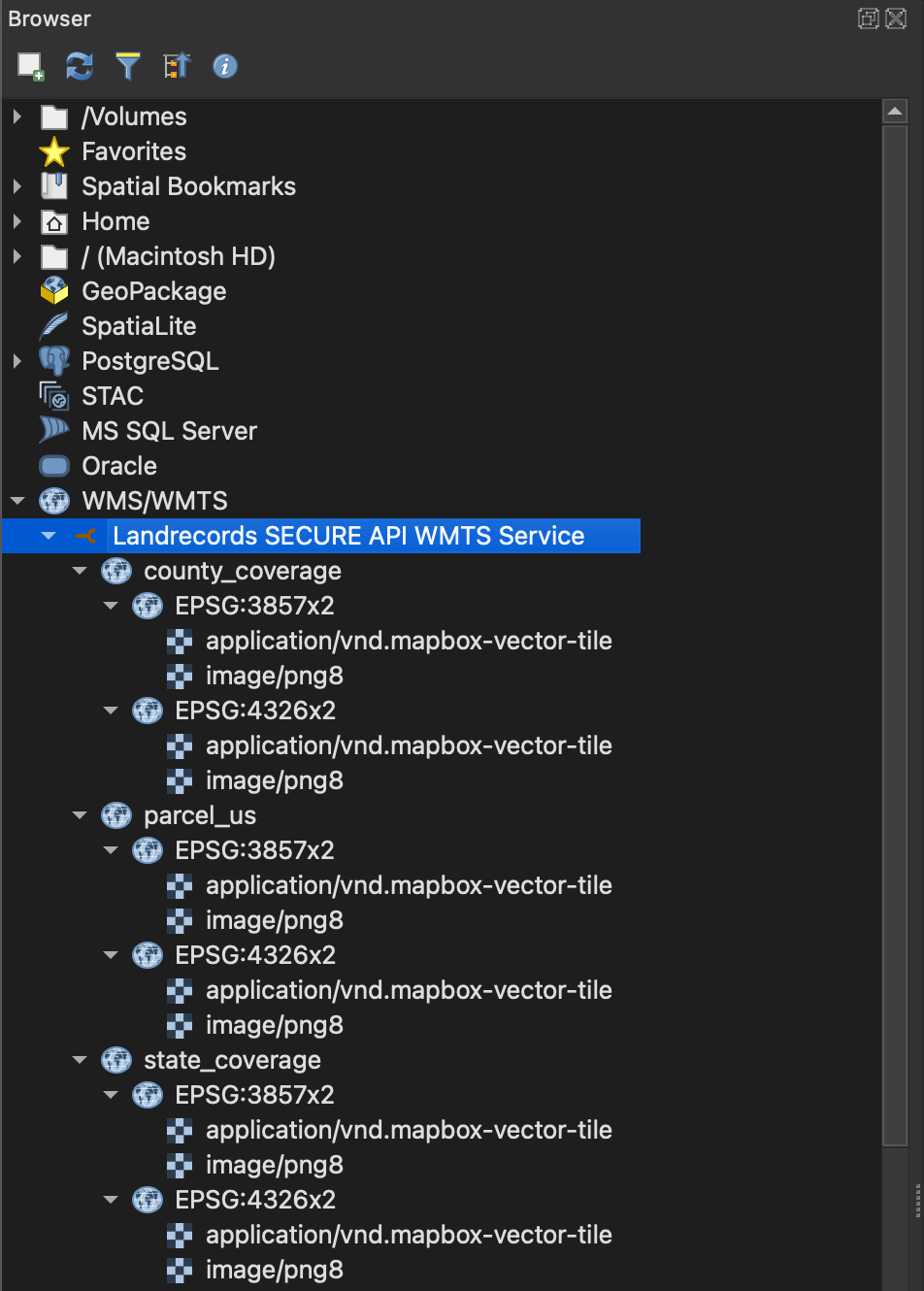
The WMTS document publishes pro:parcel_us, pro:state_coverage and pro:county_coverage
over the EPSG:3857x2 and EPSG:900913x2 tile matrix sets, in both
application/vnd.mapbox-vector-tile and image/png8.
QGIS: Configure in an XYZ / Vector Tiles Connection
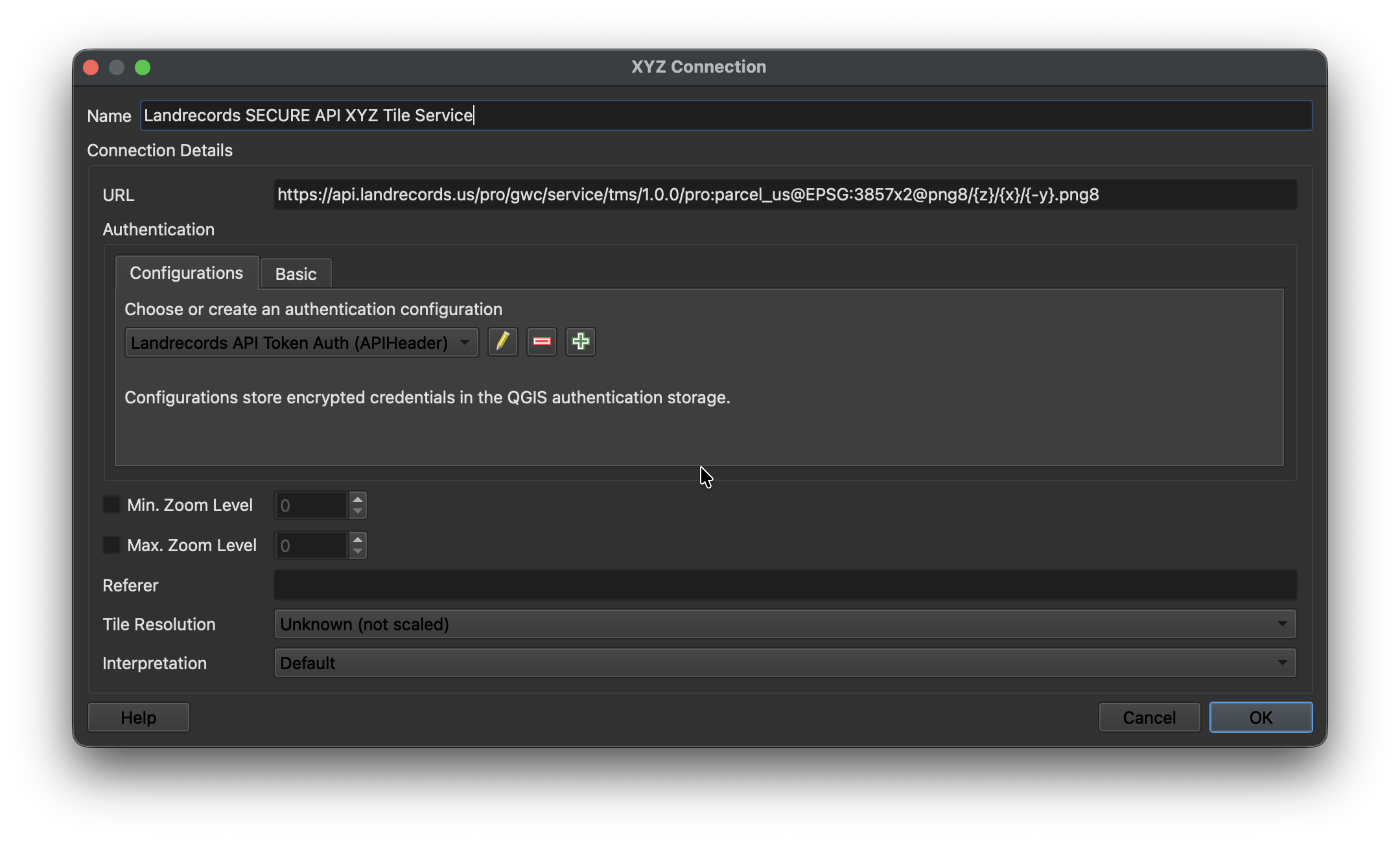
Create a new XYZ Connection (for raster) or Vector Tiles Connection (for MVT):

Configure the connection with the Landrecords API endpoint. Use the standard {z}/{x}/{y}
ordering — QGIS's {-y} flip is not wanted here, because these paths already serve
top-left rows.
https://api.landrecords.us/pro:parcel_us@EPSG:3857x2@pbf/{z}/{x}/{y}.pbf

https://api.landrecords.us/pro:parcel_us@EPSG:3857x2@png8/{z}/{x}/{y}.png8
Tile zoom ranges
The parcel layer has data from zoom 12 upward, for both vector and raster tiles:
| Layer | Served zooms | Notes |
|---|---|---|
Raster (png8) |
z12–z22 | Zoom <12 → 404 (nothing renders there). Above z16, tiles are re-rendered from their parent tile; high zooms (≥18) are rendered on demand and never persisted — they carry a 14-day browser cache header instead of being served as static objects, so they re-render across sessions. |
Vector (pbf) |
native z12–z16, overscaled above | Zoom >16 returns geometry scaled up from its parent tile; <12 → 404. |
Requesting a zoom outside these ranges returns a 404, never an empty tile — a transparent
tile is indistinguishable from correctly rendered empty ocean, and would hide a client-side
coordinate bug behind pixels that look fine. Served tiles are cached 14 days and marked
immutable; a 404/204 is cached only one hour.
Set the Authorization header to include the API key that was provided to you after signing up for the hosted web service.
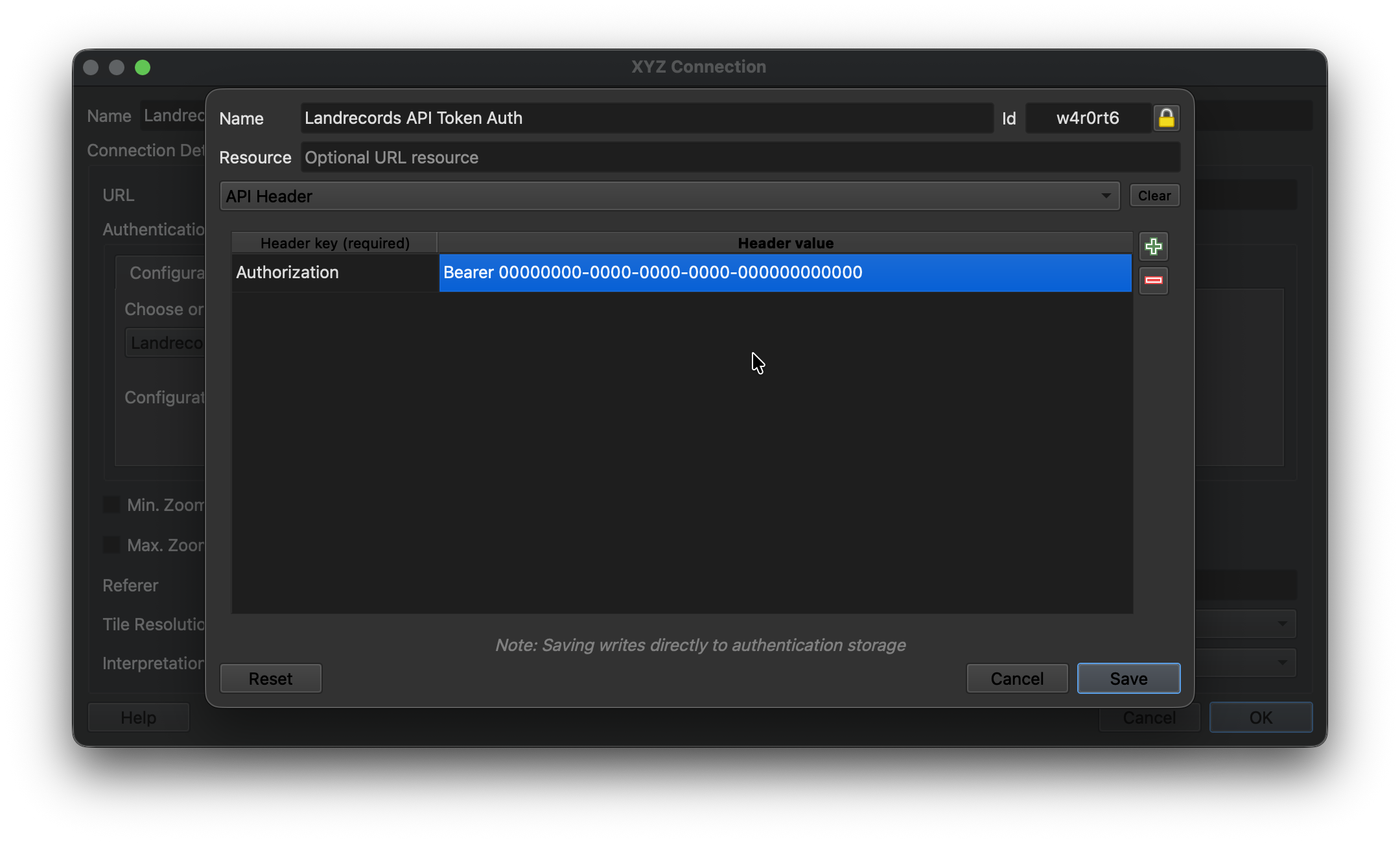
Click Save, and now you’re ready to add this layer to your project.
Parcel Detail Lookup
In addition to the tile services described above, the full WMS and WFS endpoints let you retrieve attribute details for an individual parcel. The two typical lookup patterns are by lon/lat (e.g. a click on a rendered map) and by lrid (a direct, attribute-based lookup). The parcel feature type is pro:parcel_us, served from:
- WMS:
https://api.landrecords.us/pro/wms - WFS:
https://api.landrecords.us/pro/wfs
Both endpoints accept the same Bearer token used by the tile services. For brevity, the URL examples below use ?token=<TOKEN> so they can be pasted directly into a browser; programmatic clients should prefer the Authorization: Bearer <TOKEN> header instead.
Lookups are answered by PostGIS against the parcel polygons themselves — ST_Intersects on
geom, not a proximity guess around a centroid — so "which parcel is at this point" has one
exact answer.
Look up a parcel by lon/lat
The shortest form is our own vendor shortcut on the WFS endpoint:
https://api.landrecords.us/pro/wfs?lon=-76.2859&lat=36.8508&token=<TOKEN>WMS GetFeatureInfo identifies features at a pixel inside a GetMap-style request. Send a small bounding box around your point and query the center pixel. Note the axis order: WMS 1.3.0 with EPSG:4326 expects bbox as minLat,minLon,maxLat,maxLon (this is the most common source of bad results — flip the order and you’ll silently query the wrong place).
https://api.landrecords.us/pro/wms
  ?service=WMS
  &version=1.3.0
  &request=GetFeatureInfo
  &layers=pro:parcel_us
  &query_layers=pro:parcel_us
  &crs=EPSG:4326
  &bbox=36.8507,-76.2860,36.8509,-76.2858
  &width=101&height=101
  &i=50&j=50
  &info_format=application/json
  &feature_count=1
  &token=<TOKEN>
GetFeatureInfo with info_format=application/json will return a GeoJSON FeatureCollection. A click sent alongside a cql_filter is AND-ed with it — "the parcel
under the cursor, among those the filter allows" — rather than replacing it.
Look up a parcel by id
RESOURCEID (or its 1.1 spelling FEATUREID) fetches one feature directly:
https://api.landrecords.us/pro/wfs?request=GetFeature&resourceId=96708b9f-2f4b-398e-1c82-6fe77004432b&token=<TOKEN>WFS GetFeature with cql_filter
The WFS endpoint accepts a cql_filter parameter to search parcels by attribute or spatial
predicate, returning hydrated GeoJSON features (polygon geometry from ST_AsGeoJSON(geom),
plus the full attribute row). Standard Filter Encoding 2.0 XML in a FILTER parameter is
supported as well, over exactly the same property set; FILTER, RESOURCEID and BBOX are
mutually exclusive, as the specification requires.
Filterable properties: every property DescribeFeatureType publishes — lrid, the 89
published parcel attributes (parcelid, ownername, totalvalue, zoningcode, parceladdr,
yearbuilt, taxacres, fldzone, …) and geom. Naming anything else is reported as a
client error rather than silently returning nothing.
Operators: =, <>, >, >=, <, <=, LIKE, ILIKE, IN, BETWEEN,
IS [NOT] NULL, combined with AND, OR and parentheses. Text comparisons on the indexed
columns are case-insensitive.
Spatial predicates, on the real parcel geometry:
- BBOX — e.g.
BBOX(geom, 37.7, -75.8, 37.9, -75.5). Returns every parcel whose polygon intersects the box, including parcels larger than the box itself. - DWITHIN — e.g.
DWITHIN(geom, POINT(-75.6 37.7), 100, meters); distance is true metres on the spheroid. - INTERSECTS with a point — e.g.
INTERSECTS(geom, POINT(-75.6 37.7)). An exact point-in-polygon test, the same one a map click uses.
One condition must be indexed
parcel_layer is 160M rows, and only these columns carry an index: lrid, parcelid,
parcelid2, ownername, geoid, ownertype, accesstype, placetype. A filter that
constrains none of them (and carries no spatial predicate) is a sequential scan that would end
in the 20-second statement timeout, so it is refused up front with an
ows:ExceptionReport naming the properties that work. One indexed condition is enough —
geoid = '51710' AND usedesc ILIKE '%single family%' is fine, because geoid drives the scan
and the rest filters it. Note that an OR is only as selective as its worst branch.
statefp and countyfp together count as a geoid. The geoid column is the
5-character county FIPS — statefp followed by countyfp — so a filter that pins both
(with = or IN, in the same AND group) is answered from the geoid index even though
neither column is indexed on its own:
statefp = '48' AND countyfp = '113' AND totalvalue > 500000works exactly like geoid = '48113' AND totalvalue > 500000. Either half alone is still
refused.
At most 3 predicates besides the county
A filter may hold at most 3 predicates, not counting conditions on geoid, statefp
or countyfp — the county anchor is free, everything else is bounded. Every predicate
counts toward the one total, including spatial predicates and every branch of an OR; an
IN (...) list or a BETWEEN is a single predicate however many values it names. So
geoid = '48113' AND totalvalue > 500000 AND yearbuilt > 2000 AND bedrooms >= 3 is at the
limit, and a fourth non-county condition is refused with an ows:ExceptionReport saying so.
A clause the parser cannot compile is likewise a 400, never silently dropped: a narrowed
filter that reports success is indistinguishable from one that was honoured.
Special cases:
ownernameis matched as full-text tokens rather than as a substring, soownername = 'SMITH JOHN'finds the name in any order andownername LIKE 'SMIT%'is a prefix search on the last token. A leading wildcard is unnecessary — token matching already means "contains".LIKEongeoidis refused; use=,IN, or aBETWEENover the 5-character county prefix.
Example request:
https://api.landrecords.us/pro/wfs?request=GetFeature&cql_filter=ownername%20LIKE%20'SMITH%25'&count=10&token=<TOKEN>Control how many features are returned with count / maxFeatures / feature_count
(default 10, hard maximum 10), and page with startIndex. An unfiltered GetFeature
returns an estimated numberMatched with zero features — a count, not a 160M-row download.
Other WMS operations
request=GetMapcomposites the raster pyramid into an arbitrary bbox and size (up to 4096 px per axis), for clients that want one image instead of a tile grid.request=GetLegendGraphicreturns the legend swatch.request=DescribeFeatureType&typeNames=pro:parcel_usreturns the GML 3.2 schema — the authoritative list of property names and types for both filter languages.
Querying from an AI assistant or agent
The same serving layer is also exposed over the Model Context Protocol at https://api.landrecords.us/mcp, so Claude — or any MCP-aware client or agent — can query parcels directly through eight structured, read-only tools instead of hand-written CQL. Authentication is the same token used above, sent as Authorization: Bearer <YOUR_TOKEN>, and MCP access is included in the Pro plan.
See the Parcel MCP Server documentation for endpoints, the tool reference, and agent examples.
Secure Parcel Layer Web Services
Visit https://landrecords.us/enterprise-web-service to learn more.